
Have you ever asked yourself how you can start a blog for free? Stay with me to learn how to start a blog and make money online with it. Linda Ikeji’s blog is one of the trending news blog of all times. If you too want to start a local news blog and you don’t where to start, my friend don’t go anywhere, you will learn all of that in this article.
In 2018 I stumbled across a term blog. I didn’t know that it existed before 2018, what intrigued me was the fact I could make money online by writing. I was like woah, did I get that right? I can make money without having to go search for a job! I just wanted a piece of that too, that is when I learnt to write blog articles on free blog sites.
You might have been hearing that starting a blog is so complicated but Earn Online Lesotho is here to convince you that creating a successful blog is not as daunting as many people think. In fact, by following the step-by-step instructions in this article, you will be able to set up and make your own blog, avoiding pitfalls and missteps that hinder some novices (no technical skills needed).
Now let’s take a look at how this article is organised:
- What is a blog?
- How to start a blog
- Blogging platforms
- Blog set up instructions
How to Start a blog – step by step guide
At this stage, you’ll need to determine the type of blog management platform/tools you want to use. It is recommended that you setup your blog on one of the self-hosted platforms. However you can still start with the free platform if you don’t have enough money. Before you make the decision, let me describe each option.
When it comes to starting a blog, you have the following options:free, freemium and self-hosted (recommended) platforms. But for you to start a successful blog, you need to consider the following points:
• Choose a blogging platform
• Pick a domain name
• Get a web hosting account.
• Install blogging software and set up a blog
• Select a blog design and layout
Choosing blogging platform for a successful content marketing
Free blogging platforms
For many new bloggers, the availability of free blogging platforms such as Blogger or Tumblr is tempting. Of course, there is one big benefit, it’s free. But you need to understand that having a blog name in this form — yourname.blogspot.com or yourname.tumblr.com, is the sign of an inexperienced beginner who likely won’t betaken seriously.
By keeping your blog on a free platform, you let the platform own your name. You’ll be subject to their rules and restrictions, they may limit or prohibit ads on your blog, or they may even place their own ads on your blog. However if you feel like you want to experiment, start on free platform. Free platforms are good for people in the developing world since rate of exchange is a bit high; $1 is equivalent to M14.75 as of this writing. That is why my blog is still using a free platform.
Freemium platforms
Freemium means you’ll have a trial period before you have to start paying (costs vary from $5 to $30 per month). Several platforms are available. One of the most popular is TypePad. This platform focuses on ease of use for writing, but customization options are limited and it lacks certain features of value to bloggers.
By default, your TypePad blog name will look like this: yourname.typepad.com. It’s not always the best option if you’re trying to buildthe name and brand for your blog. However you could point yourown domain (purchased through any domain registrar) to a TypePadblog.
Self-hosted blogging platforms
Self-hosted platforms allow you to run a blog on your own domain. Aside from following your domain registrar and webhosting company’s rules, you’re fully in charge of your blog and its contents.
You have number of choices when it comes to a self-hosted blog system (also called Content Management System or CMS).The most popular is WordPress.org.
This blog option is called self-hosted because you will use your own web hosting space and name for your blog. It normally costs$4 to $8 per month for the web space (hosting account), depending on the company you choose, and $12 to $15 per year for the name (domain). The actual CMS is usually open-source and free.
One of the best and mostwell-known self-hostedcontent management systems(CMS) is WordPress.org, powering25.4% of all websites inthe world and responsible forover 76.5 million blogs, whichis recommended by 99% ofthe blogging experts I took their guidance.
Although we mentioned some free blog-hosting options, the best course of action is to own your blog, especially if you will be using your own copyrighted material (articles, drawings, photos, etc.). Pay a certain amount of money monthly, If you plan to sell products, services, music or anything else via your blog, then paid hosting is the best way to go. Many hosting providers can help you maintain an ecommerce blog.
To get your new self-hosted blog started, you need to decide on two important things: a domain name and a web hosting provider.
We highly recommend Bluehost that powers over 2 million websites world wide and only for our visitors, they offer a special deal that includes a FREE domain name.
Pick a domain name for you blog
Your domain name will be the name by which you will be known online, no matter what niche you choose. It’s the unique address of your blog on the Internet. Your domain will be yours as long as you continue paying the annual fee ($10 to $15 for a .com domain).Users who know your domain/URL (uniform resource locator)can simply type it into their browser’s address bar. Others will be able to discover your blog through search engines such as Google and Bing, so you definitely need to find a unique name for your brand.
Your domain name may be the highly popular “dot com” or it may be country or niche specific. From .us (United Sates) to .co.uk(United Kingdom) and from .guru (yes, for life coaches) to .sport(for sports related domains), these top level domains (TLDs) are added to any domain name in order to point to their location. The general rule is to go for a “dot com” domain, but some of the other extensions can work. For example “dot net” or “dot me.”
In the end, it’s about being memorable, so if a different extension or country code helps you be memorable, then break the rules!
Get a web hosting account Install blogging software and set up a blog
After choosing a domain name, selecting a reliable web hosting services will be one of the most important decisions you make. To a great extent, the functionality and performance of your blog will depend on your hosting provider. The host makes sure your blog is available24/7 to potential readers and it’s where your files are stored online.
Most hosting companies also offer domain registration services.
Some people keep their domain name with the registrar company, separate from the hosting account. We recommend keeping it all under your hosting account for hassle-free management and maintenance.
The wrong web host can cause many problems with your blog.
Just imagine choosing a mobile company that has no reception.
Your web host is a major piece of the puzzle to maintaining a successful blog, therefore, it’s crucial that you choose a reliable provider.
Now it’s time to get your domain name and web hosting account ,and create your new blog. Bellow you will find our recommended hosting provider — Bluehost.
Step by step guide on how to set up a blog in 1 day
This section provides detailed information to help you sign-up for web hosting account and set up a WordPress blog. We also included screenshots of the pages that you need to go through.
Step One
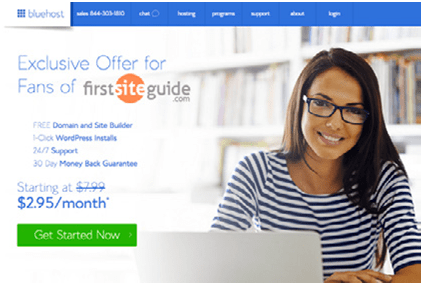
Use this link to get the special deal from Bluehost. Then click the
“Get Started Now” button.
Step Two
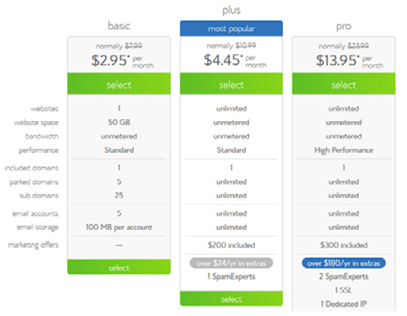
You should start by selecting your plan. If this is your very first one, you should go with the basic one – at least until you explore your options. The one called plus should be able to cover all your needs once you get your blog going, and you should consider the pro version once your popularity skyrockets.
Step Three
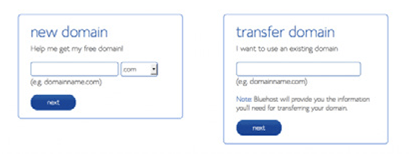
Your domain name has an important say when it comes to the future success of your blog, so you should take your time to come up with something new. Just type in a desired domain in this “new domain” box and BlueHost will show you whether it’s available or not. If not, it will provide you with a list of similar names for you to choose from.
Step Four
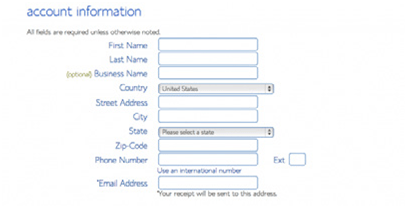
After you pick out your domain name, BlueHost will take you to the registration page where it will be required from you to fill in your personal info including the billing data. A couple of minutes is all you need.
Step Five
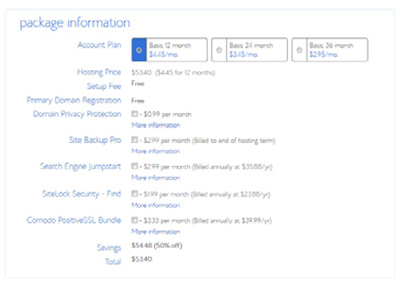
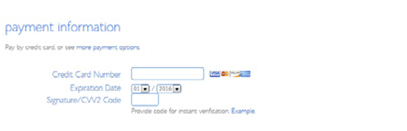
Pay additional attention to your hosting options. Obviously, the 12month package has the lowest price, but the other two are great when you want to make a long term investment. You can feel free to un check the rest of the boxes – you can always get them later when you find them necessary.
Step Six
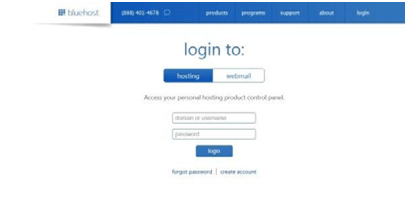
After you check that terms and regulations box, you’re ready to log in.
Visit BlueHost’s homepage and you’ll be able to see their login button in the upper right corner. Type in your domain/username and your password.
Step Seven
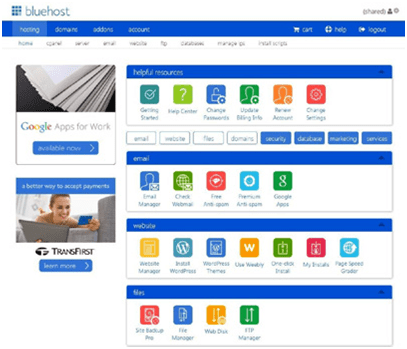
Once you’re logged in, you’re ready to install WordPress. Under the website section, you should be able to see a WordPress icon.
Step Eight
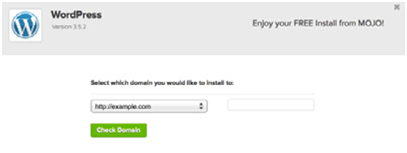
Once you click install, BlueHost will take you to a short WordPress description, after which it will be required from you to check your domain name.
Step Nine
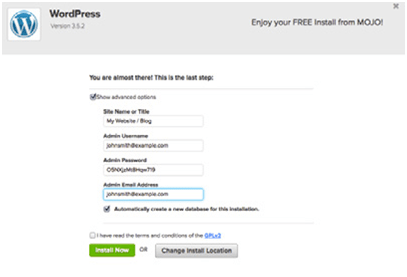
If you check their “show advanced options” box, you’ll be able to type in your username, site title and password, but you should be aware of the fact you can change either one of them later, other than your username.
Step Ten
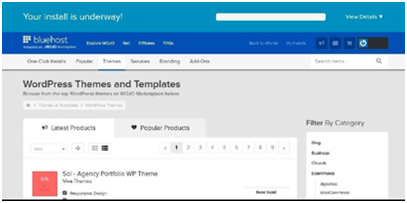
Once you check and double check every letter you have entered, click “install now” and the installation process will begin
Step Eleven
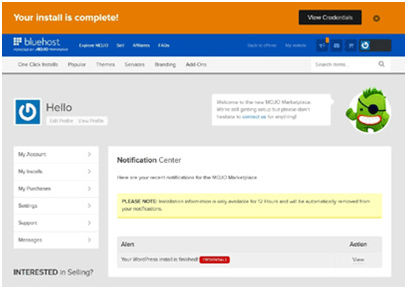
Once your installation is complete, you will receive an email about your credentials, after which you can browse through various theme sand templates in order to find the one according to your needs.
How to Select a blog design and layout
After WordPress is installed, the first thing your blog needs is a face (design and layout). The design of your blog can be easily changed with the Themes. The default theme that comes with your WordPress blog installed is Twenty Sixteen — while it’s a good starter theme, you could select a theme that is more unique to your blog and compatible with your niche.
Choose a theme that looks great, but also works for your unique content needs. Your readers will first notice the overall appearance of the blog, before even taking a look at the content.
Once your installation is complete, you will receive an email about your credentials, after which you can browse through various themes and templates in order to find the one according to your needs.
1. Read the description
Most themes come with a short description of features and functionality. By reading it, you should have a rough idea if the theme matches your needs and how customizable it is.
2. Preview the theme
Preview the theme to get an idea of the overall look and layout.
3. Check the ratings
Popular themes will have star ratings that are visible in the preview and under theme details. They should give you a clear idea how good the theme is.
4. Check for responsiveness
Aim for a responsive design that will work on desktop browser sand mobile devices. This is recommended by Google. If you find a theme that takes your breath away, cool down. Once you install a theme you like, don’t be surprised if it doesn’t look quite right. Your theme is just a skeleton of your blog. To make it appealing, you’ll have to fill in content (text, photos, videos, etc.).
REFERENCES
OgiDjuraskovic, Kristi Hines & the FirstSiteGuide Team
Firstsiteguide.com


What kind of camera is that? That is definitely a really good top quality. https://Youlike124.com/register-slotonline/
LikeLiked by 1 person
thanks for commenting Youlike124, actually the pictures i got them from here “OgiDjuraskovic, Kristi Hines & the FirstSiteGuide Team
Firstsiteguide.com”
LikeLike
Simply looked at a few of your pictures (: i’m actually happy i reached job
darkness you. You’re terrific! https://Youlike124.com/register-slotonline/
LikeLiked by 1 person
Simply looked at a few of your pictures (:
i’m actually happy i reached job darkness you. You’re terrific!
Also visit my homepage สล็อตออนไลน์ฟรีเครดิต
LikeLiked by 1 person
thanks i will look up at your blog
LikeLike